
NPM vs. Bun: Which Package Manager Should You Choose?
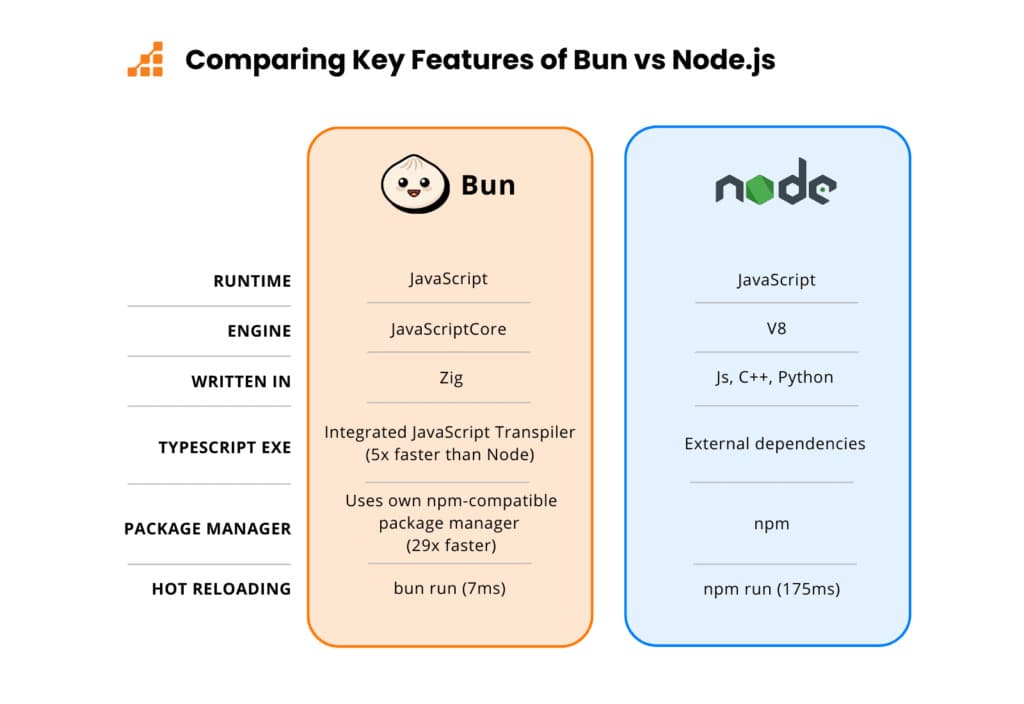
As a JavaScript developer, the choice of package manager can significantly influence your development experience. Two prominent options today are NPM (Node Package Manager) and Bun. While both share similarities, they also have distinct differences that could impact your project's workflow and efficiency.
In this article, we'll embark on a comprehensive comparison of NPM and Bun to help you decide which package manager is best suited for your needs.

Understanding NPM
NPM (Node Package Manager) has been the default package manager for Node.js since its inception in 2010. With a rich ecosystem and extensive community backing, NPM is renowned for its stability and maturity. It's no wonder it’s a popular choice among JavaScript developers.
Key Features of NPM
- Extensive Package Registry: Boasting the largest collection of open-source packages, NPM offers a plethora of libraries and tools for any development need.
- Dependency Management: Efficiently manages project dependencies while supporting semantic versioning.
- Script Automation: Automates tasks like testing, building, and deploying projects through NPM scripts.
- Wide Adoption: Its longstanding presence ensures a wide array of community support and documentation.

Discovering Bun
Introduced in 2021 by Jarred Sumner, Bun is a fairly new contender in the package management arena. It aims to provide a faster, more efficient alternative to traditional package managers, combining package management with bundling and transpiling capabilities.
Key Features of Bun
- Blazing Fast Installations: Promises significantly faster install times compared to traditional package managers.
- Bundler Integration: Comes with a built-in bundler, doing away with the need for separate tools.
- Built-in Transpiler: Supports TypeScript, JSX, and other modern JavaScript features straight out of the box.
- Optimized for Performance: Designed to handle large projects and complex dependencies with greater efficiency.
Core Features Comparison
Let's dive deeper into the core features and performance aspects of NPM and Bun.
Installation Speed
- NPM: Known for its slower installation speed due to sequential processing of dependencies. Despite improvements over the years, it can be sluggish for projects with numerous packages.
- Bun: Built with performance in mind, Bun leverages parallelized installations and optimized dependency resolution, significantly reducing setup times, especially for large projects.
Bundling and Transpiling
- NPM: Primarily a package manager. For bundling and transpiling, developers typically rely on external tools like Webpack and Babel, adding layers of configuration and complexity.
- Bun: Integrates bundling and transpiling functionalities directly within its package management system, simplifying the development process with modern JavaScript features readily supported.
Package Management
- NPM: Offers a robust set of features including versioning, publishing, and dependency management. Its registry contains over 1.6 million packages. However, dependency conflicts and versioning issues can arise.
- Bun: Focuses on efficiency and simplicity. While its registry isn't as vast as NPM's, it supports essential package management features and aims to minimize conflict with a smoother dependency resolution process.
Configuration and Usability
- NPM: Highly flexible configuration options, but can be overwhelming for new developers due to complex files like package.json and package-lock.json.
- Bun: Streamlines the configuration with a more straightforward approach, using integrated tools to minimize the number of configuration files, thereby offering a more cohesive development experience.
Performance Comparison
Here's a quick look at the performance differences between NPM and Bun:
|
Feature |
NPM |
Bun |
|---|---|---|
|
Installation Speed |
Slower, sequential processing |
Faster, parallelized processing |
|
Bundling |
Requires additional tools (e.g., Webpack) |
Built-in bundler |
|
Transpiling |
Requires additional tools (e.g., Babel) |
Built-in transpiler |
|
Package Registry |
Extensive, 1.6 million packages |
Growing, not as extensive |
|
Configuration |
Complex, multiple configuration files |
Simplified, integrated configuration |
|
Dependency Resolution |
Can be slow and prone to conflicts |
Optimized, efficient |
Ecosystem and Community Support
- NPM: Benefits from a large and active community, offering extensive documentation, tutorials, and support. Its long-standing presence ensures stability and reliability.
- Bun: Still developing its ecosystem. While it's gaining attention for its innovative features, it doesn't yet match the breadth of NPM's community support. However, its growing community is contributing to its ongoing development.
Compatibility and Integration
- NPM: Its compatibility with various tools and frameworks is well-established, having been rigorously tested across numerous environments.
- Bun: Designed to work well with modern JavaScript projects but may have limited compatibility with older or less common tools due to its focus on speed and simplicity.
Use Cases and Recommendations
NPM:
Best For: Developers needing a mature, stable package manager with extensive community support and a large package registry.
Ideal Projects: Large-scale projects with complex dependency management needs or projects relying on a wide range of existing packages.
Bun:
Best For: Developers seeking a fast, integrated solution for package management, bundling, and transpiling.
Ideal Projects: Modern JavaScript projects prioritizing speed and simplicity, looking to streamline their toolchain.
Conclusion
Both NPM and Bun offer valuable features for JavaScript developers, catering to different needs and preferences. NPM remains a reliable choice with its extensive ecosystem, community support, and mature features, making it particularly suitable for complex projects.
On the other hand, Bun's focus on performance and integration presents a compelling alternative for those seeking a faster, more streamlined toolset. Its built-in bundler and transpiler, combined with parallelized installation, make it an attractive option for modern projects looking to simplify their development workflow.
Ultimately, your choice between NPM and Bun should align with your specific project requirements and development preferences. By understanding the strengths and limitations of each tool, you can make an informed decision that enhances your workflow and productivity.